
Free printable resource
Plan your character's appearance and keep them recognizable from page to page. Get a free worksheet, illustrated example, and consistency checklist.
Your character, ready for their first adventure.
Download a character worksheet, Lily's illustrated example, and a practical consistency checklist. Print the pages you need and keep them beside you while you work.
Download the free PDF3 pages · US Letter · No account or email required
What's inside the kit?
A character worksheet
Choose a name, story role, personality, and recognizable features. Record what stays fixed and what can change between scenes.
An illustrated example
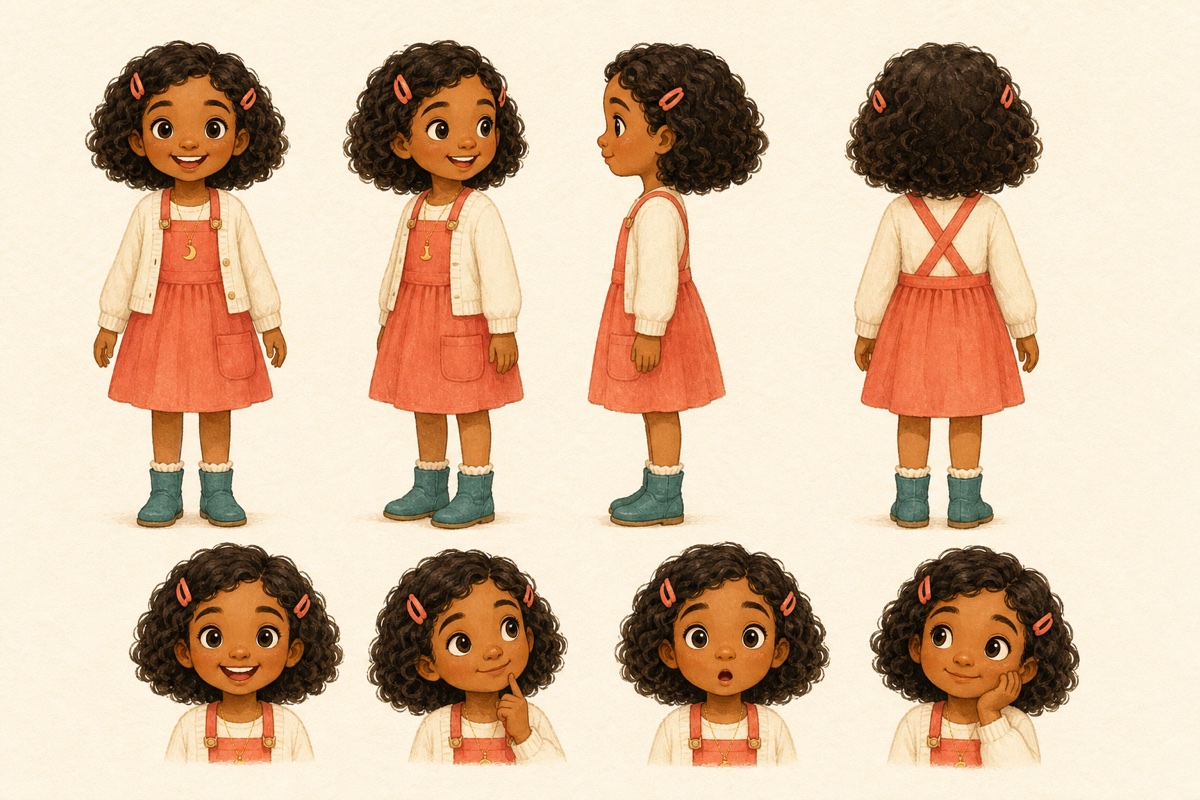
See Lily's reference sheet beside two story scenes. Compare the details that make her recognizable as the setting and pose change.
A consistency checklist
Check the face, hair, proportions, clothing, and accessories. Use the scene-brief prompts to plan your next illustration.
How to use your character planner
Start with the story.
What does your character want, and what makes their adventure matter? Write a few words about their personality before choosing the visual details.
Choose a few recognizable features.
A distinctive hairstyle, outfit shape, or accessory can make a character easier to recognize. Use specific descriptions and decide which details should stay fixed.
Make a clear visual reference.
Use your notes to draw a reference sheet, brief an illustrator, or develop a character in StoryBookWriter. Include the views and expressions your story needs.
Review each page against the same reference.
Let the pose, action, setting, and lighting change. Check that the character's identity still carries across those changes.
Read the illustrated guide to keeping characters consistent.
From reference sheet to story scene

What would you check?
- The shape and length of her curls
- Her coral hair clips
- The dress, cardigan, necklace, and boots
- Her face and childlike proportions
Lighting can change how colors appear. Look at the design as a whole, and use focused corrections for details that drift.
Before you download
Do I need an account or an email address?
No. The kit is available directly as a PDF. You only need an account if you choose to create a book in StoryBookWriter.
Can I use the worksheet with an illustrator or my own drawings?
Yes. The worksheet is a planning tool, whether you draw, work with an illustrator, or use AI-assisted illustration.
Can I type into the PDF?
This version is designed for printing and writing by hand. You can also annotate it in a PDF app.
Does the kit generate images?
No. It helps you plan and review your character. Image generation happens separately inside the Studio and uses the allowances of your plan.