For independent children’s-book authors

Self-publish a children’s book, with consistent character illustrations.

StoryBookWriter is one connected studio that takes your story from idea to a print-ready illustrated book — no juggling separate AI tools, and no guessing at Amazon KDP’s trim and bleed requirements by hand.

  • Free to start
  • No subscription
  • KDP-ready export available

Same character. Different scenes. No drift.

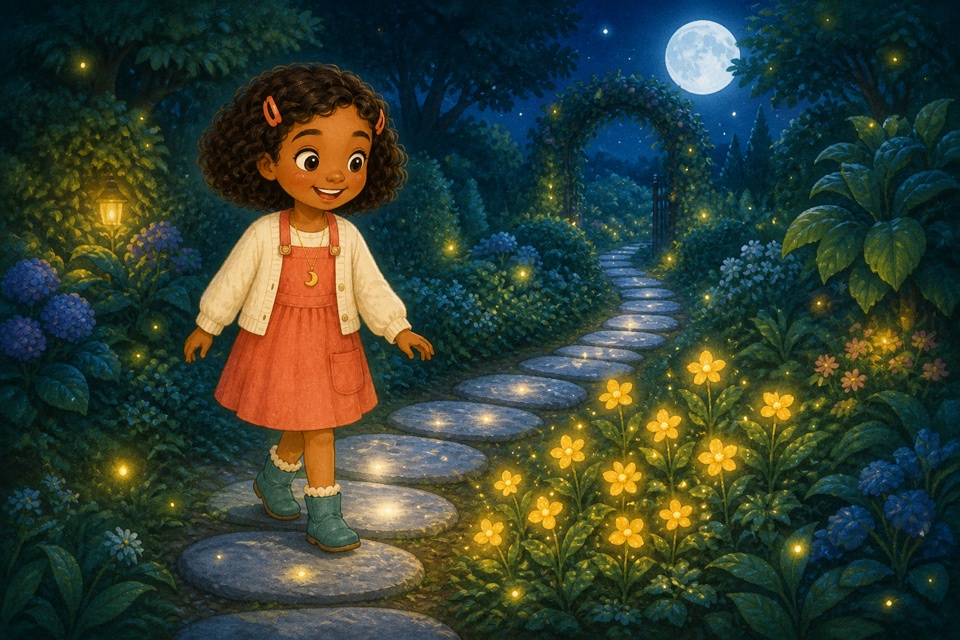
Lily exploring a magical moonlit garden, illustrated in a consistent character design
Lily followed the silver path into the moonlit garden.
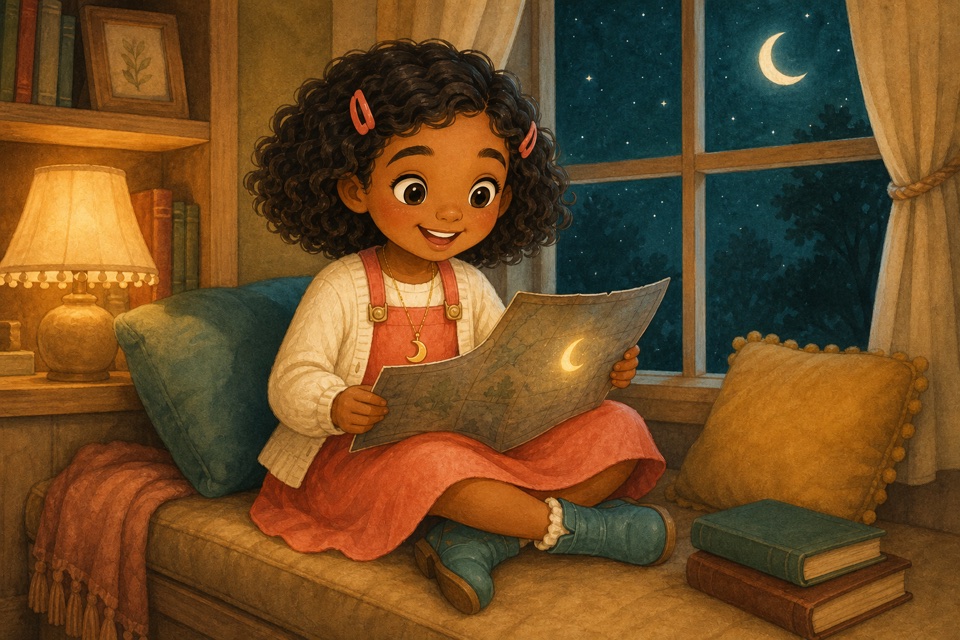
The same Lily character discovering a clue on a map in a cozy reading nook
By the window, she opened the map and found one final clue.

Every scene is generated from Lily’s approved character sheet, not a fresh text description each time — so she looks like herself throughout the book.

Most AI book tools break the same way.

Generate an illustration, and the character looks a little different than last time. Fix that in a second app. Copy your text somewhere else to lay it out. Guess at KDP’s trim, bleed, and spine width by hand. By the time you’ve stitched five tools together, the story you wanted to tell is buried in browser tabs.

StoryBookWriter is the one studio built to fix that — not add another tab.
How it works

From an idea to a print-ready book, in one place.

  1. 1

    Start with an idea, outline, or your own manuscript

  2. 2

    Approve a structured story blueprint

  3. 3

    Build each character’s sheet once; every page reuses it

  4. 4

    Write and illustrate side by side, page by page

  5. 5

    Export a KDP-ready file with trim, bleed, and spine already calculated

Built for authors, not one-shot generators

Everything a self-published book actually needs.

Character consistency

Lock a character’s face, clothes, and features once. Every scene generates from that same reference, so illustrations don’t drift page to page.

You edit everything

Rewrite a line, redirect a scene, or fix one detail on one page — without regenerating the whole book from scratch.

KDP-ready export

Interior and cover files come out sized to Amazon’s exact print specs: 8.5″×8.5″ or 8″×10″, full bleed, spine width calculated from your page count.

Try before you pay

Build a full watermarked preview — story, characters, illustrations — before spending a cent. Upgrade only when you’re ready to export.

Pricing

Pay once. No subscription, ever.

Explore

Free Preview

One book, 20 AI credits, full studio access, watermarked preview export.

Start free
Plan a series

Three-Book Bundle

$50 one-time. 150 AI credits, clean, print-ready KDP export for three books.

Get the bundle

See all plan details

Questions authors ask

What to know before you begin.

Do I need a finished manuscript to start?

No. Start with a single idea, an outline, or a complete draft — the Studio keeps your starting material editable as the book develops.

Will my character look the same on every page?

An approved character sheet becomes the canonical visual reference for every scene, so illustrations stay consistent instead of drifting from page to page.

Is it easy to publish the book I make on Amazon KDP?

Paid plans include print-ready interior and cover PDF sized to KDP’s paperback specifications, ready to upload to Kindle Direct Publishing.

Is there a subscription?

No. Every plan is a one-time payment — a free preview, or a one-time purchase for one book or a three-book bundle.

Your story deserves more than a generator

Open the Studio. Start with one page.